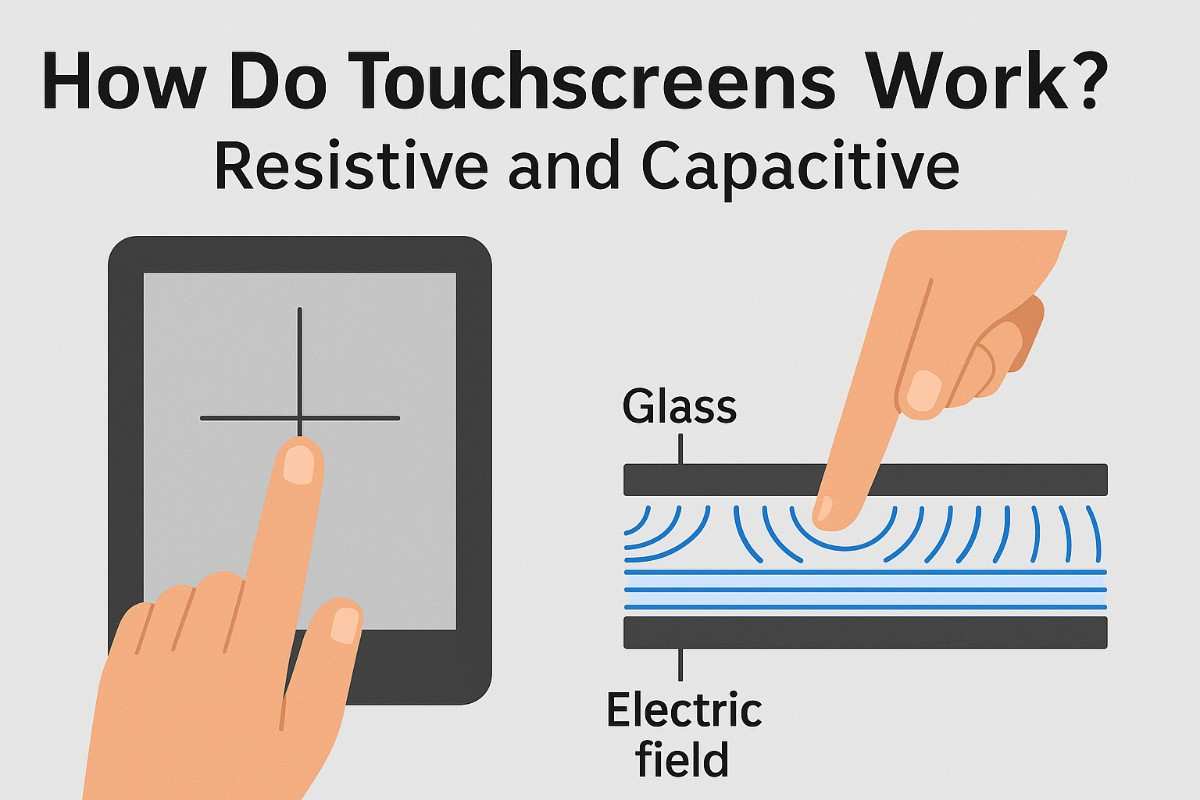
How do touchscreens actually work? Resistive and Capacitive Touchscreens.
Touchscreens feel like magic, but understanding how touchscreens work reveals a mix of clever engineering and everyday physics. In 2010, during a cold winter in South Korea, people struggled to use their phones while wearing gloves,
In 2010, South Korea experienced a particularly cold winter. People couldn’t activate their smartphones while wearing gloves, so they began wielding snack sausages-causing one company to see a 40% rise in sausage sales.
So, what could sausages do that gloves couldn’t? In other words, how do touchscreens actually work?
How Resistive Touchscreens Detect Your Touch
In 1965, the first ever touchscreen was invented to help British air traffic controllers efficiently update flight plans. However, the technology was too unwieldy and expensive for widespread use. Over the following decades, engineers further developed this technology and experimented with alternative kinds of touchscreens. Soon, resistive touchscreens dominated the market. But then, in 2007, Apple released the first iPhone. It was a breakthrough, yet it functioned using the same principle as the first touchscreen: CAPACITANCE.

Nowadays, capacitance and resistive touchscreens are two of the most common types. Both use an external input to complete their electric circuits. In conductive materials, electrons flow around atoms, forming an electric current. In contrast to insulators, the electrons in the conductors are weakly bound and flow easily. Just as ancient practices link body rhythms and technology, check how morning routines influence our physiology in this article.
A resistive touchscreen has two layers. The top is a clear, flexible material—usually plastic—while the bottom is something rigid, like glass. These layers are coated with a conductive substance and separated by a thin gap. When something pushes hard enough, the layers connect, completing the electric circuit. This cause a change in voltage that the machine’s software reacts to. Resistive touchscreens can be a little unresponsive, but they’re generally cheap and durable, so they’re favored for industrial or mass use.
How Capacitive Touchscreens Work in Modern Devices
A vast majority of the touchscreens produced in 2007 were resistive. But in the years following the iPhone’s release, most became capacitive. Individual models vary, but smartphones touchscreens today typically consist of a protective, insulating glass exterior and an LCD/LED screen at the bottom that produces the images you see.
Between the glass exterior and the LCD/LED screen are several sheets. One is lined with rows of a transparent conductive material that carry an alternating electric current. A thin later separates these conductive lines from others that arranged as columns. One on top of the other, the lines form a grid. The points where they intersect are called nodes. The phone’s battery draws electrons along the first layer of lines, and some electrons accumulate at every node, creating a small electric field. These screens are called capacitive touchscreens because the nodes act like capacitors by storing charge.
For a clearer scientific breakdown of capacitive and resistive screen behavior, see this reliable guide on how touchscreens work.
How the Touchscreen Grid Detects Your Finger Input
They’re generally easier to use than resistive touchscreens because they intersect directly with your finger without the application of force. Your body is a great conductor and is constantly transmitting alectric currents. Why? Because about 70% of you is water. Now, while chemically pure water is an insulator, most water is impure. The water inside you is loaded with ions—atoms or molecules that have a net electrical charge. So when you click on an app, your finger functions like a third electrical line. It interacts with the existing electric field, which induces a weak electric current that travels through your fingers and eventually back into the phone. This changes the amount of charge at the affected nodes. And voltage measurements along the second layer of lines, tell the phone’s microprocessor which part of the screen is being touched.
Touchscreens are just one piece of the puzzle in how we interact with modern devices, see how the internet revolutionised interaction in our deeper article on using the Internet effectively.

Why Fingers Work but Gloves Don’t
However, if you try using a smartphone while your hands are wet or gloved, you’ll probably have some trouble. Both interrupt the electrical connection between your finger and phone. If water is splashed across the screen, it might trigger many underlying nodes, and the phone could act like you’ve touched it in multiple places at once. On the other hand, gloves are insulators so the charge has nowhere to go. Meanwhile, objects that conduct electricity about as well as your finger—like banana peels and certain processed meats—can all activate the screen—knowledge that can come in clutch, when you’re in a pickle.
Our Social Accounts


Good info. Lucky me I reach on your website by accident, I bookmarked it.